A Great Demo in Two Days With Claude
Demos are a big part of my job. And a tailored demo, built on the customer’s actual priorities, beats a generic product tour every time. The problem is time. A good tailored demo used to take anywhere from a couple days to a week or more of building, depending on the complexity of the ask(s).
In Q3 2026 we owed a customer a tailored demo of request intake and routing. I built it in two days on a throwaway developer instance, with Claude doing most of the typing. It landed extremely well, and afterward the customer asked how parts of it could carry into another project of theirs.
Here’s how it came together, and the method I kept so the next one is even faster.
What makes a great demo in the first place, the script, the tailored build, and the deck, gets its own post later in this series. This one is about how Claude helped me build one in two days.
Day 0: scope it
Before anything gets built, a short scoping step decides what goes on screen. Thirty minutes, one job: what’s in, what’s out. Not a requirements workshop.
I’d already run the discovery sessions on earlier calls, so we pre-filled it from those notes and let the scoping call confirm and rank. People correct a draft much more easily than they answer a blank page.
The result was a short, prioritized list:
- A simple “hero” request flow to walk slowly.
- A richer “contrast” flow to walk fast and show it scales.
- Routing to the right fulfillment group with no manual triage.
- Visibility for a fulfiller and a manager.
The room was a mix of business and IT, so the story stayed on clean intake, routing, ownership, visibility and notifications. Heavy automation got suppressed.
Day 1 morning: paper first
No instance yet. Claude wrote two documents first, both grounded in the discovery notes so nothing was invented:
- The run-of-show (the demo script). Six timed segments, each with a talk track, a click path, an IT-depth layer for when the room leans in, and the landmines to avoid.
- The build spec. Variables, mandatory and conditional rules, routing, the fulfillment flow, and state mapping.
Writing the script before the build sounds backwards. It isn’t. The script tells you exactly what to build, and just as important, what NOT to build.
Day 1 afternoon: build it
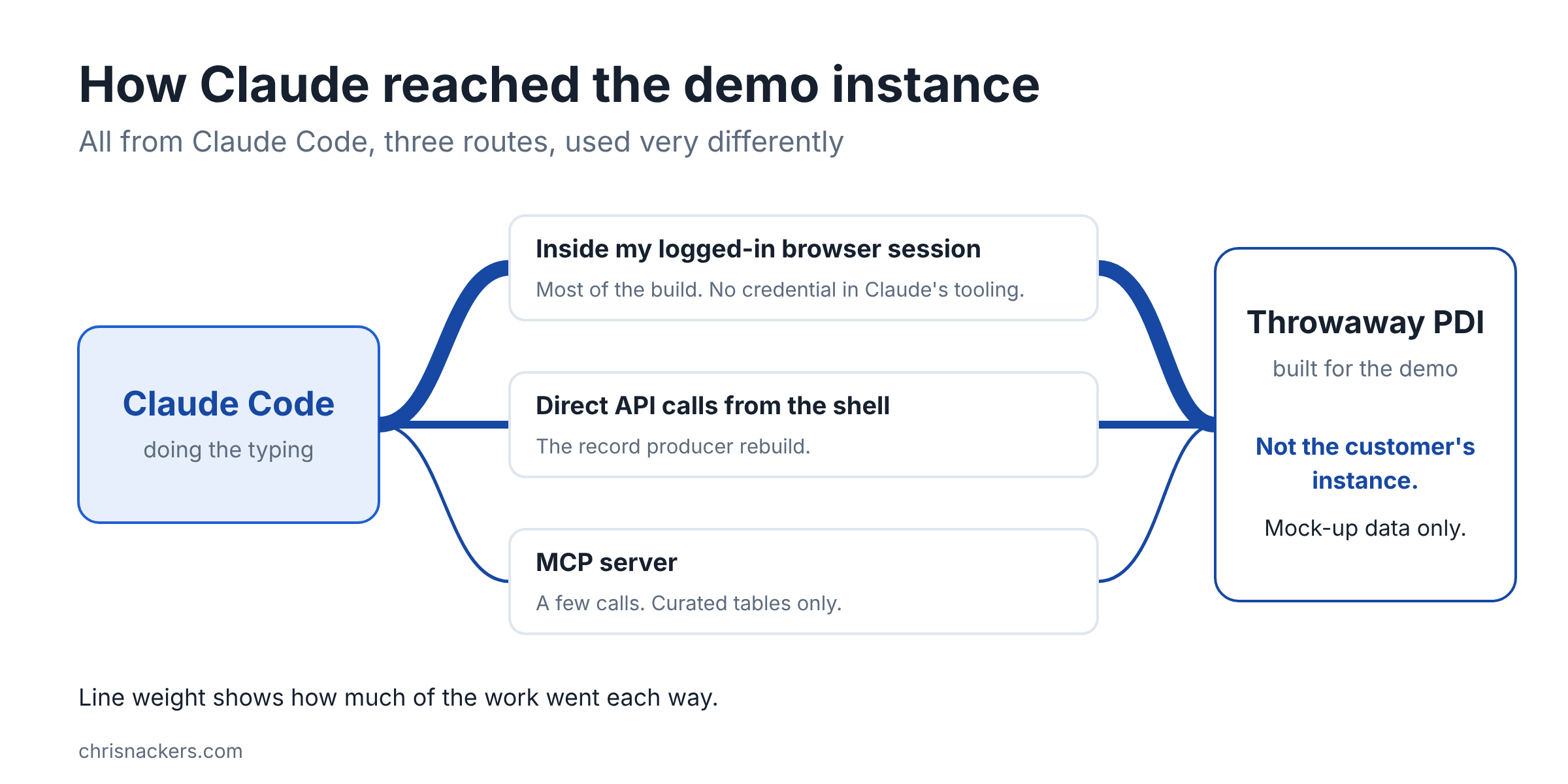
I spun up a throwaway personal developer instance (PDI) and logged in as admin in my own browser. To be clear, this was a PDI built only for the demo. It was NOT the customer’s instance, and none of their data was in it. It was all mock-up data. From there, Claude worked from Claude Code, mostly from inside my own logged-in browser session, with some direct calls from the shell and a few through an MCP server. The browser session meant no credential ever sat in Claude’s tooling for the first pass.
It built the assignment groups, a catalog category, three personas (requester, fulfiller, manager), the two catalog items with their variables, and the routing.
Then later, in between meetings, I made a call. The two catalog items became record producers that create incidents. One native Submit button, no cart, no checkout, no approval stage. It’s simpler for the room to follow, and it’s the honest fit for what the customer actually needed. Claude rebuilt that piece over the API from the shell, re-pointing the 18 existing variables and both client scripts instead of recreating them.
NOTE: the MCP server only covered a curated set of tables (no record producers, reports, tasks or system properties), so the plain table API did most of the heavy lifting. More on that in a later post.
It finished with a manager dashboard and some portal polish: a hero search, popular-request cards, and a “my open requests” list.
Day 2 morning: demo day prep
The build is only half of it. The other half is making sure it holds up live.
- Fresh data. A refresh script deleted the sample incidents and re-seeded them, so every SLA timer started at demo time instead of reading “breached.”
- Session timeout. A persona’s session timed out mid-walkthrough, so the idle timeout went from the stock 90 minutes to 480. Record the original value so you can put it back.
- The host node. A developer instance sits on a shared host you don’t get to pick. We checked which node it landed on before the demo, because a slow node changes the whole feel of the walkthrough.
- Insurance. All 110 customizations from the build went into a named update set, plus a rebuild kit: a bootstrap script that recreates the groups and users with their original ids, so a lost instance could be rebuilt fast.
The rebuild kit never had to get used. That’s the point of insurance. There for when you need it. However, I can rebuild that entire demo very quickly if I ever need to repeat it for another customer.
Personas: one Chrome profile each
This is my gold standard for demos. Each persona gets its own Chrome profile, already logged in. Switching from requester to fulfiller to manager is one click, no logging out, no fumbling in front of the room. It’s faster and a lot more seamless.
One gotcha: setting the persona passwords through the API didn’t work on that PDI, for whatever reason. I set them by hand in the UI. Two minutes, done. Sometimes, you just have to do it the old-fashioned way instead of troubleshooting scripts and APIs.
The honesty line
A demo should never imply a capability you don’t have running. If you show it, someone will expect you to build it, and that’s a promise somebody has to fund.
The method keeps a “built, narrated, skipped” line in the run-of-show for exactly this. For this demo the line was easy: everything we showed was built and shown live.
The deck follows the same rule. Every product image in it matches what’s actually built. The deck was built as a fallback in case the instance misbehaved, but it ended up doing two other jobs. I walked through it briefly at the start to set the stage, then went live, and afterward it went to the customer as the hand-out.
Who did what
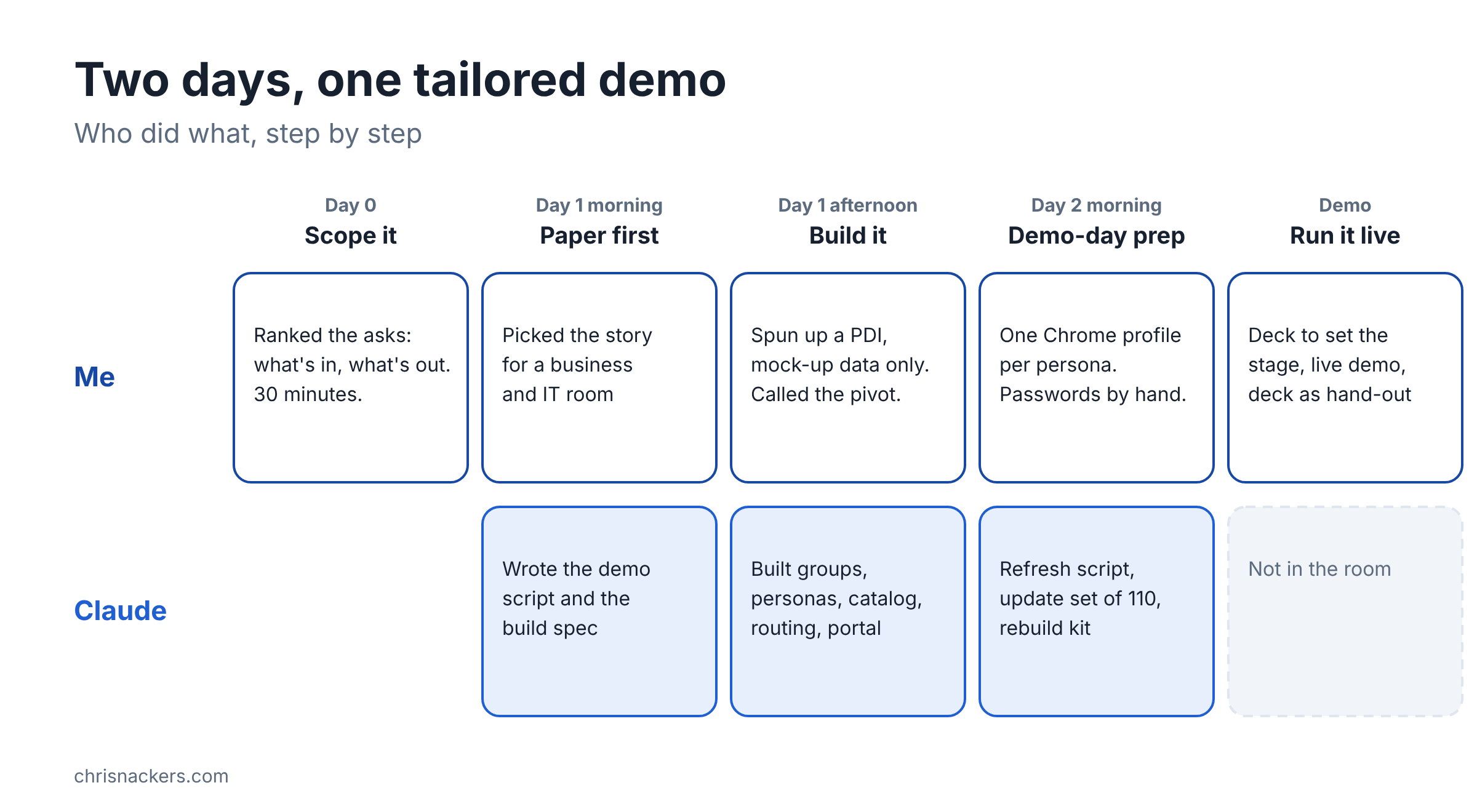
Claude did the typing and the drafting: the run-of-show, the build spec, the configuration, the scripts, the deck. I architected the whole plan and design and used Claude as my own personal development pod to do the work for me. The calls stayed mine: what to show, what to suppress, the pivot, the passwords, and the room.
That split is the whole point. Claude made two days possible. It didn’t make the calls.
Gotchas worth knowing
If you build demos on a PDI, these will save you some time:
- PDIs hibernate. Wake it well before you build and again the morning of.
- Don’t release and recreate the instance before a demo. It wipes the build.
- The table API silently drops a few catalog config fields. Re-point existing variables and scripts instead of recreating them.
- Portal pages are slow to first paint on a shared instance. A blank screen for 8 to 10 seconds means loading, not broken.
- The stats page only renders in a browser session, not over REST.
- Keep the original value of every shared setting you change. You’ll want it when you put things back.
Keep the method, not just the demo
After the demo, the one-off work became a reusable method: the section library, the scoping questions, the run-of-show template, a build playbook with a gotcha list, and a guide for the deck. The next demo starts from a library, not a blank page.
I ran the same method again in Q4 2026 for a different customer. The scope plan took a day, the developer instance landed the same morning I asked for it, and the build took one day instead of two. This time most of the build ran as task cards handed to cheaper agents while I made the calls. More on that in a later post.
If you want to try it, start small:
- Scope before you build. Thirty minutes, what’s in and what’s out.
- Write the run-of-show first. Let it tell you what to build.
- Let Claude do the typing. You keep the judgment and the keys.
- Draw the honesty line. Show only what’s real.
Hope this helps a fellow solution consultant with a demo coming up. Let me know how you build yours!
-Chris